# Converting CRV + staking cvxCRV

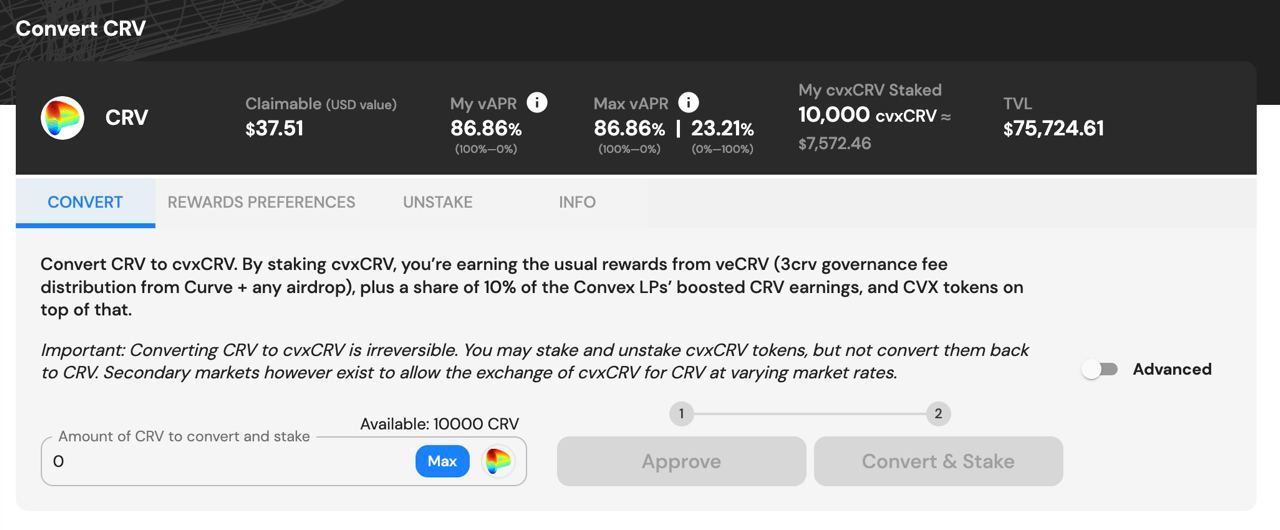
#### 1. Navigate to the "Stake" page and then the "CRV" section.

<figure><img src="https://2181409797-files.gitbook.io/~/files/v0/b/gitbook-x-prod.appspot.com/o/spaces%2F-MXUXhi90m2Jg6S04DpE%2Fuploads%2FEZm1LTPar6IfUEKzPGL0%2Fimage.png?alt=media&#x26;token=49ac44b0-6fd9-4ffc-b3b0-72aac123fded" alt=""><figcaption><p>Convert CRV section of the "Stake" main landing page</p></figcaption></figure>

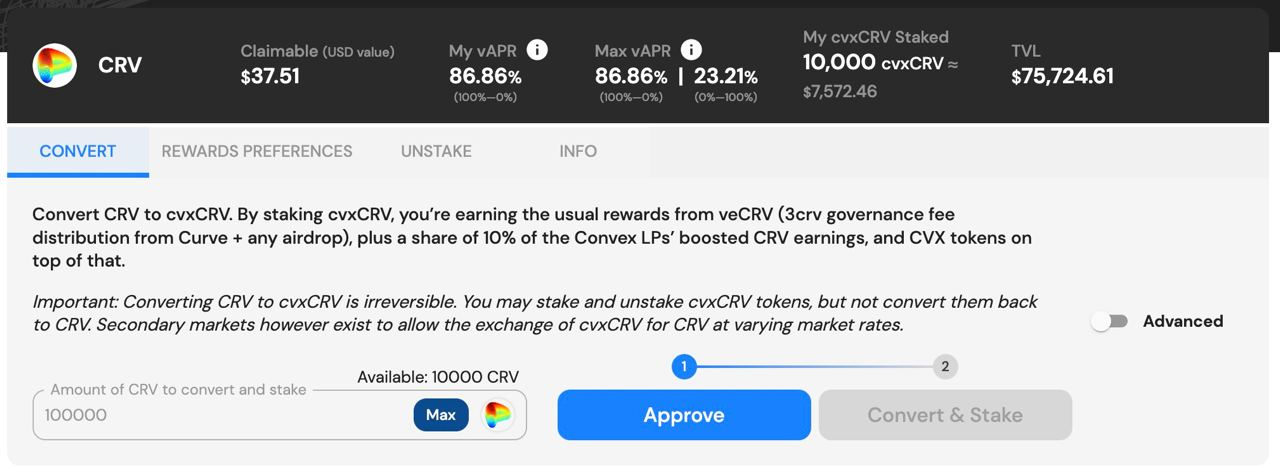
#### 2. Enter the quantity of CRV tokens you would like to convert to cvxCRV. If it is your first time using the platform, you will have to approve your CRV tokens for use with the contract by pressing the "Approve" button.&#x20;

{% hint style="danger" %}

### *Remember, this process is irreversible. You will not be able to convert cvxCRV to CRV using the platform.*

{% endhint %}

<figure><img src="https://2181409797-files.gitbook.io/~/files/v0/b/gitbook-x-prod.appspot.com/o/spaces%2F-MXUXhi90m2Jg6S04DpE%2Fuploads%2F4ydptVFaFM9ubHr5b4SP%2Fimage.png?alt=media&#x26;token=551411be-17ef-4939-88aa-20d846b6a85e" alt=""><figcaption><p>Approve CRV tokens for convert and stake</p></figcaption></figure>

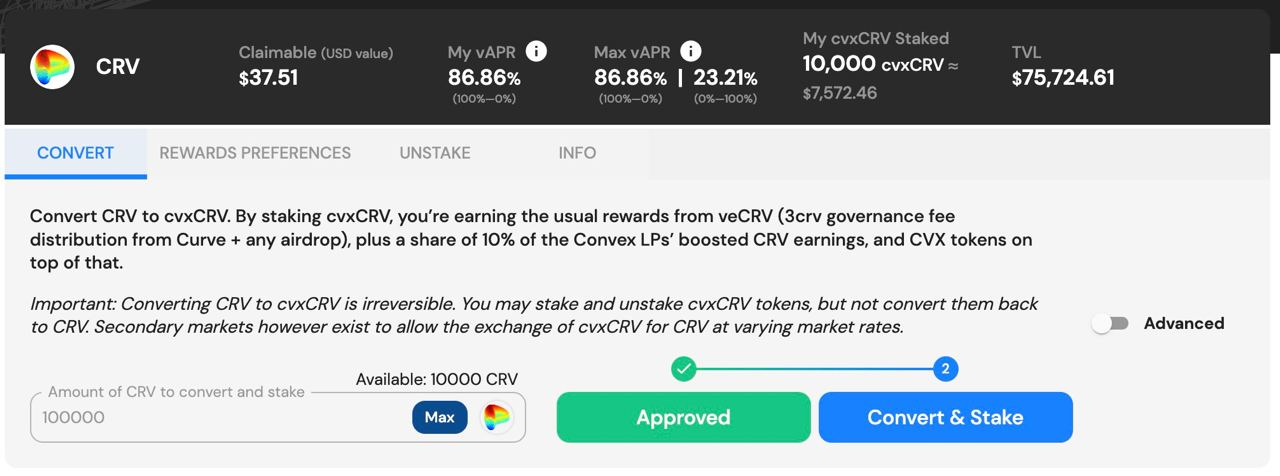
#### 3. Once tokens are approved and a valid quantity of tokens are entered in the field, click "Convert and Stake" to irreversibly convert CRV to cvxCRV and stake on the platform.

<figure><img src="https://2181409797-files.gitbook.io/~/files/v0/b/gitbook-x-prod.appspot.com/o/spaces%2F-MXUXhi90m2Jg6S04DpE%2Fuploads%2Fc3u7h1JM2TsIK77Mh9cx%2Fimage.png?alt=media&#x26;token=b3c6d36f-9473-4dde-ac53-464d2ab14802" alt=""><figcaption></figcaption></figure>

## cvxCRV Staking Reward Ratio Interface

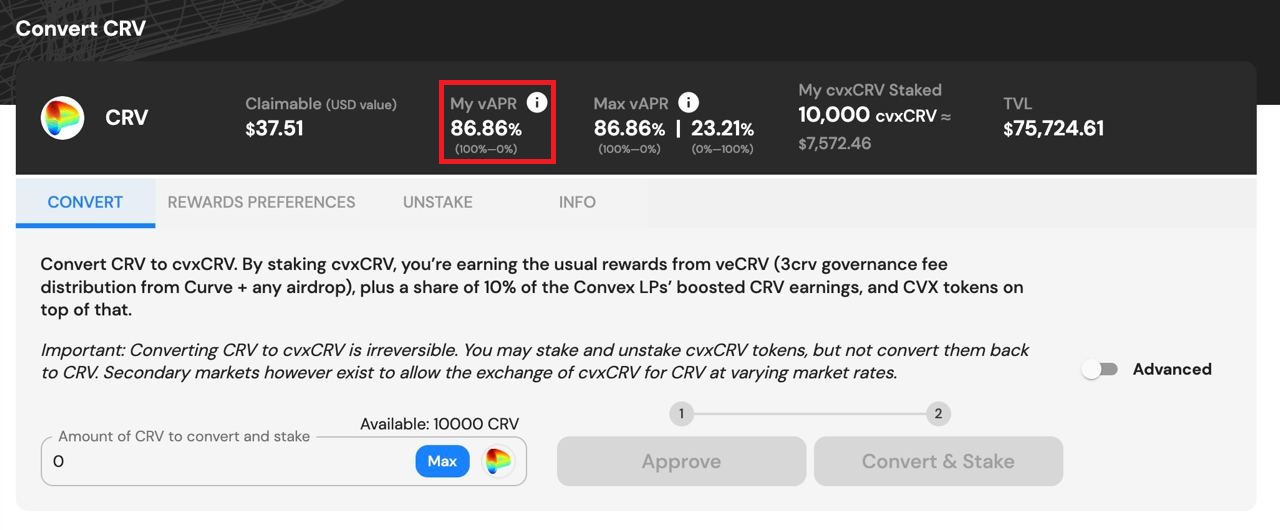
Users with staked cvxCRV can view their rewards vAPR by clicking the "My vAPR" info icon:

<figure><img src="https://2181409797-files.gitbook.io/~/files/v0/b/gitbook-x-prod.appspot.com/o/spaces%2F-MXUXhi90m2Jg6S04DpE%2Fuploads%2Fi3MEsNFvmhCxW6r0DM77%2FnewVerMy.jpg?alt=media&#x26;token=b7e4161d-afcb-4b8e-8edf-b1e9b96cbb89" alt=""><figcaption><p><strong>↓</strong></p></figcaption></figure>

<figure><img src="https://2181409797-files.gitbook.io/~/files/v0/b/gitbook-x-prod.appspot.com/o/spaces%2F-MXUXhi90m2Jg6S04DpE%2Fuploads%2FOQKIMh7wiJwhvnelczkm%2Fimage.png?alt=media&#x26;token=d9ec232a-e54d-4914-a011-09c640bcce83" alt=""><figcaption></figcaption></figure>

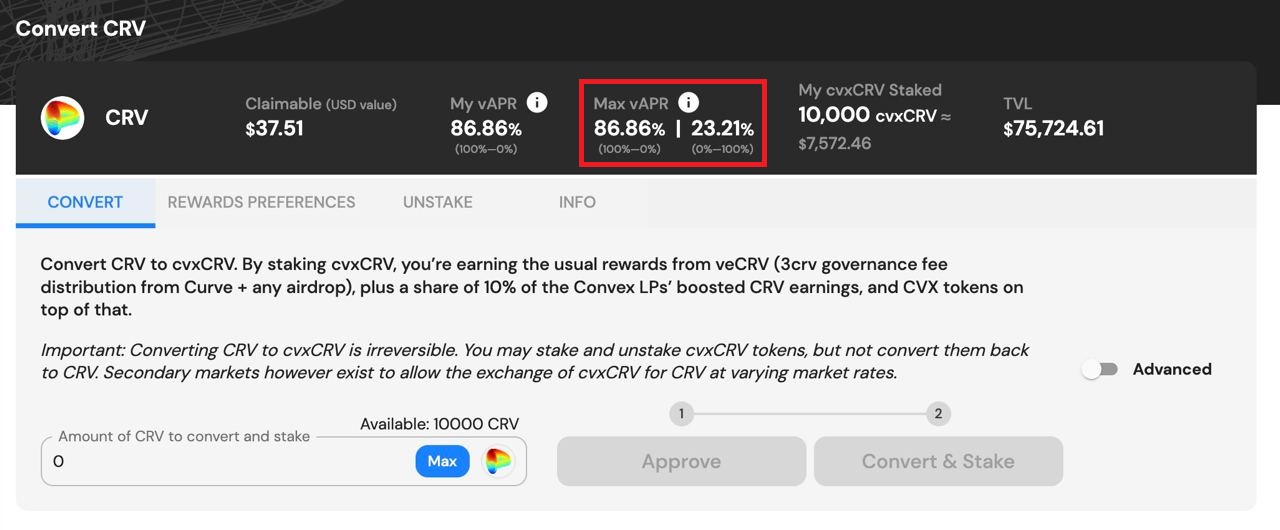
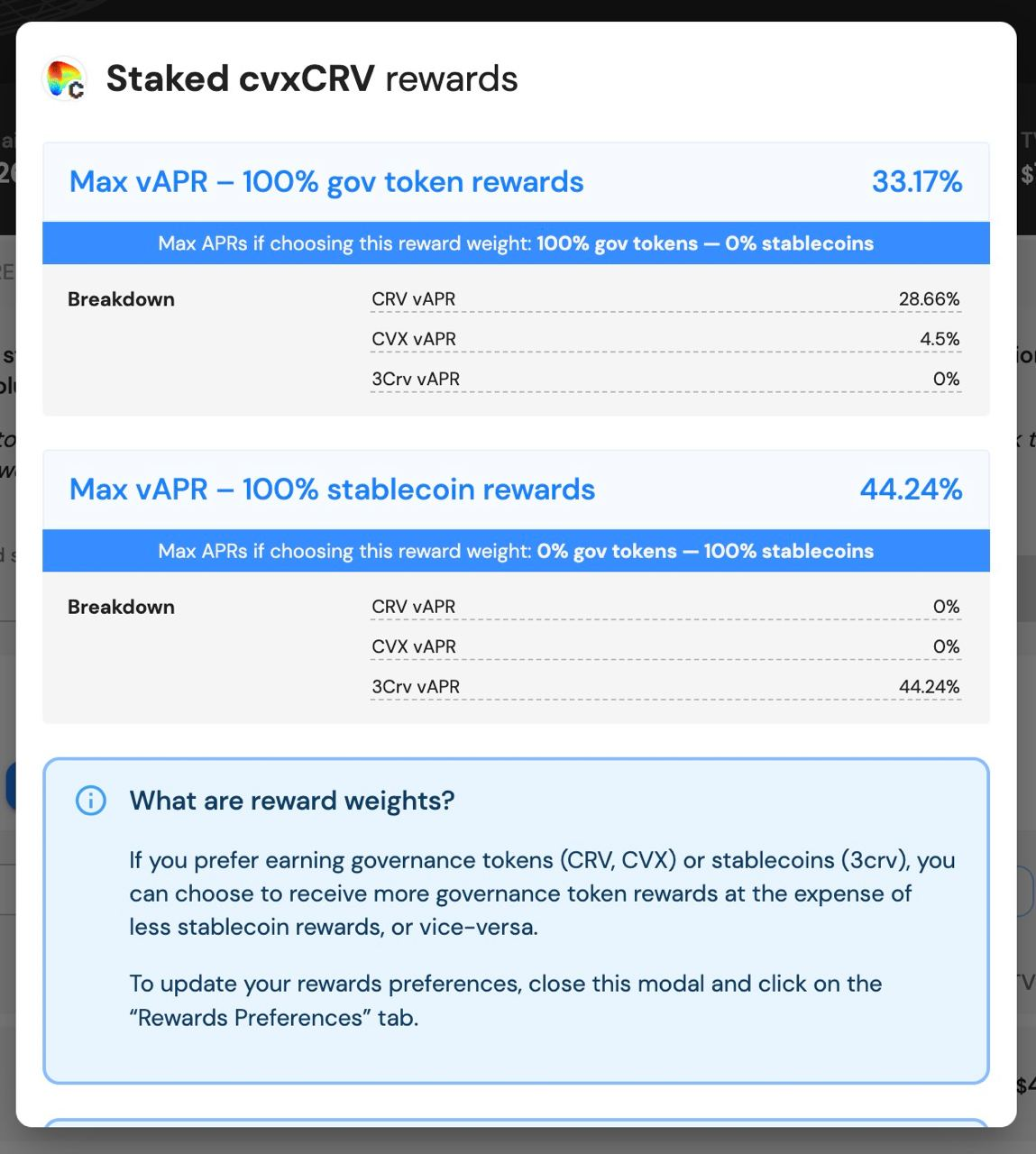
Additionally, users can see what the vAPR would be in the case of receiving rewards as 100% **crvUSD** or 100% governance tokens by clicking "Max vAPR" info icon:

<figure><img src="https://2181409797-files.gitbook.io/~/files/v0/b/gitbook-x-prod.appspot.com/o/spaces%2F-MXUXhi90m2Jg6S04DpE%2Fuploads%2FTk3WWFbuYTJZRdXu871s%2FnewVerMAX.jpg?alt=media&#x26;token=b15eff2c-64fa-4225-9945-df80d71e8052" alt=""><figcaption><p><strong>↓</strong></p></figcaption></figure>

<figure><img src="https://2181409797-files.gitbook.io/~/files/v0/b/gitbook-x-prod.appspot.com/o/spaces%2F-MXUXhi90m2Jg6S04DpE%2Fuploads%2FcuFexoDZl5KvSxPuSboX%2Fimage.png?alt=media&#x26;token=867d2923-bb7b-4c68-95aa-bb136bea939b" alt=""><figcaption></figcaption></figure>

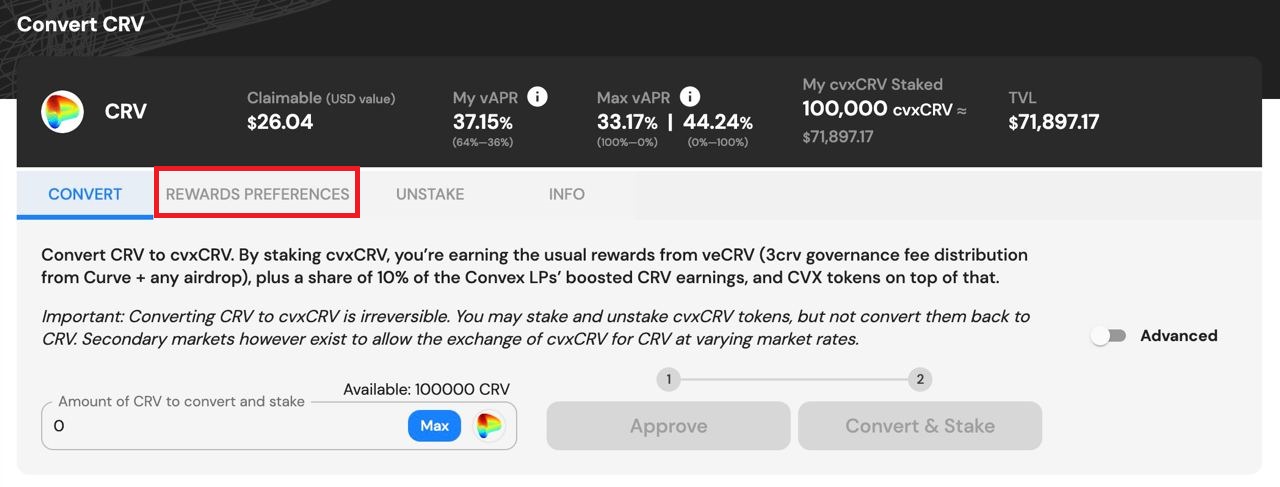
Users wishing to change their reward distribution can do so by navigating to the "Rewards Preferences" tab (alternatively, you can also access this on the "Claim" page):

<figure><img src="https://2181409797-files.gitbook.io/~/files/v0/b/gitbook-x-prod.appspot.com/o/spaces%2F-MXUXhi90m2Jg6S04DpE%2Fuploads%2FtxMLtbe8MxvhZcInqrCQ%2Frewardpref.jpg?alt=media&#x26;token=75d76b22-e46d-4893-bd86-20bd352b71b9" alt=""><figcaption><p><strong>↓</strong></p></figcaption></figure>

<figure><img src="https://2181409797-files.gitbook.io/~/files/v0/b/gitbook-x-prod.appspot.com/o/spaces%2F-MXUXhi90m2Jg6S04DpE%2Fuploads%2FMv9YJde58Bw2TdBRCTnJ%2Fimage.png?alt=media&#x26;token=02918c23-745d-4252-9a75-246989ee22fd" alt=""><figcaption></figcaption></figure>

{% hint style="info" %}
**Note**: Percentages do NOT represent USD values. Picking “80%/20%” does NOT mean you’ll be distributed $80 worth of gov tokens and $20 of stablecoins. If CRV+CVX rewards are one pie, and **crvUSD** rewards another pie, your reward preferences, alongside everybody else’s preferences, decide how big your slice of each pie is.
{% endhint %}
---

# Agent Instructions: Querying This Documentation

If you need additional information that is not directly available in this page, you can query the documentation dynamically by asking a question.

Perform an HTTP GET request on the current page URL with the `ask` query parameter:

```
GET https://docs.convexfinance.com/convexfinance/guides/depositing/crv.md?ask=<question>
```

The question should be specific, self-contained, and written in natural language.
The response will contain a direct answer to the question and relevant excerpts and sources from the documentation.

Use this mechanism when the answer is not explicitly present in the current page, you need clarification or additional context, or you want to retrieve related documentation sections.